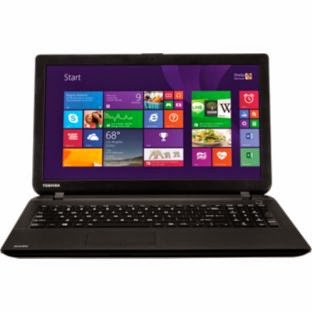
My first laptop cost me £950 back in 2003, my second £800 in 2005, so I was interested to see a laptop for less than £200 on the Argos Website. Looking through the reviews, I noticed that many of them were dreadful, complaining about the mouse pointer freezing or seeming to have a mind of its own. The laptop has a low powered CPU- basically a netbook CPU- but could it really be that bad?
Towards the end of the reviews I noticed one from somebody who had contacted Toshiba and been told that the problem was a buggy touch pad driver.
PCWorld was selling a similar Toshiba for the same price but with a slightly more powerful Intel CPU. Again the same reviews complaining about sluggish performance. One reviewer said that the laptop performed well after being updated.
My old laptop only has an 80GB hard drive, and the Toshiba C50D has a 500GB hard drive. I don't do anything on my PC that requires a powerful CPU, so I wondered if the problems reviewers had identified were in fact down to software problems, and if these computers might be a bargain.
Over Easter PCWorld offered their Toshiba for £180, with a reconditioned item for £150. I was tempted but the offer disappeared before I could make my mind up. I regretted not going for it.
Then I saw the C50D-B-120 on LaptopsDirect for £150 reconditioned and snagged one. (The buggers then reduced it to £145 the next day!)
Mine was in A1 condition as stated, but yes, the mouse pointer was slow to respond and did seem to have a mind of its own.
Windows update told me that there were more than 100 updates available, but clicking the install button seemed to do nothing- downloading 0% was the constant message.
I suspect that Windows was trying to update in the background and that the manual update failed because the automatic update process had a lock on the process.
This was confirmed when I went to shutdown later and saw a "Shutdown and install updates" message.
Windows configured some updates when it was shutting down, and then configured some more when it was booting up again.
This process- background download of updates which I as the user was unaware of until prompted to install updates when shutting down- repeated several times before Windows Update confirmed that all the available updates had been installed.
Whereupon the computer now works just fine. The mouse pointer is responsive and for simple tasks like web browsing it is perfectly snappy.
Of course most computer users, especially new computer users, to whom this computer is marketed, are just going to turn the computer on and find it doesn't work.
Sorry Toshiba, you didn't really deserve the abuse heaped upon you.
For anybody looking for a really cheap laptop that does basic computing really well, yes, you can get one.
(PCWorld was offering a reconditioned C50-B for £140 at one point.)
But you may have to spend a bit of time updating the software before it will be usable.
Microsoft, you do deserve the abuse heaped upon you. Why is this process so painful?
Of course anybody who read this blog will know I am a Linux user. The Toshiba C50D-B-120 is now running Debian Jessie, dual boot with Windows 8.1 for the time being as an experiment in UEFI dual booting. This post was made from Debian with the computer performing perfectly satisfactorily.
Future posts will look at the Debian installation process and hardware issues with this computer.
But to conclude I will say that the Toshiba C50D-B-120 so far seems to be the equal or better of either of my previous machines which cost far more, at least in the tasks I put it to. The most noticeable improvement is its much greater efficiency: the power adaptor is half the size and a third of the weight of my previous laptop's adaptor and doesn't get nearly as hot: a green machine.
Thursday, April 23, 2015
Sunday, February 22, 2015
The Microsoft ecosystem
I've just been working on an old Windows Vista laptop which I was asked if I could fix. Apparently it had had problems with a virus and the owner couldn't get on to her online email.
Trying to boot the laptop only resulted in endless failed attempts by Windows to repair itself- the system was obviously broken. I managed to find a Vista repair disc, which fixed the boot problems. Microsoft of course doesn't make these discs available, and tries to take down any copies that appear on the web. You are apparently supposed to use the system recovery partition- and then spend many hours downloading all the updates and service packs that have accrued over the last decade.
Booting into Windows was just the beginning of my problems. The laptop was locked up with constant I/O on the hard drive and processes taking up most of the available memory and CPU.
I booted into Safe Mode and used the AVG removal tool to remove AVG, which was loading into memory but not working, and installed some updates which a web search suggested might be the reason svchost.exe was locking up the system after a normal boot- automatic update trying and failing to install updates.
After that, a fairly normal boot. Multiple malware scans found only one Adware file and a few PUPs. However, I noticed that the C: partition was almost full- over 30GB- and showing red. Vista seems to store user files in C:, so I imagined I'd find a huge collection of photos or MP3s taking up the space- but no, it seemed to be Windows cruft: packages of updates left after the installation of Service Packs.
The D: partition was almost empty, and a similar size to C:, so I thought I'd resize C: to give the system more room.
Now Windows Vista will let you shrink D:, but it won't expand C:, because it's a boot partition.
I came across a post on answers.microsoft.com which kindly suggest some free programs which would shrink the D: partition and extend the C: partition. I used the first one, and here's where the real trouble began.
I noticed an annoying pop-over add for System Mechanic which told me it was a Microsoft Trusted partner, and if I ran it's scan, I could save myself from endless system crashes. (Microsoft partners tell you that Windows is so rubbish it will keep on crashing unless you emply a third party to fix it?)
Well I ignored that and used the partition program from EaseUS to resize the partitions, and it did work really well. OK, I was only going to use it once, so thank you for making it available for free. Software developers have to make money, so seeing an advert seemed a reasonable price to pay for using a good bit of software.
You might think that if Windows is going to fill its partition with cruft, they might give you the tool to fix it, but they've been in trouble before for trying to monopolise the market, so maybe they decided to throw a few crumbs down the food chain.
The problem is that where there are crumbs, there are bottom feeders lurking.
When I tried to update a program on the computer, I found that the web browsers were showing pop-up advertisements and redirecting me to other sites.
An example of the most stupid adware that makes browsing the internet almost impossible: if you can get to the site you want to visit without being redirected, it is almost obscured by advertisements, and links never seem to take you to where you want to go.
A scan by MalwareBytes revealed Conduit, OpenCandy and Roll Around were the culprits. Getting rid of everything found seemed to fix Internet Explorer, but Chrome was still showing Roll Around adds in web searches and redirecting to unwanted sites.
AdwCleaner and ESET Online Scan found and removed more traces, but Chrome was still infected: evidently some sort of hidden extension. In the end, I had to uninstall Chrome and reinstall it to fix the problem.
EaseUS should be ashamed of themselves. They have a good product, which people try to use to fix a problem, but their way of getting a financial reward for their work leaves the users of their product virtually unable to use the internet, and very probably, like me, angry and frustrated, although unlike me, possibly not having the skills to remove the despicable adware they have installed.
There are ways to get paid for a supplying a product that don't involve abusing your users- asking for a donation or a purchase of a full product, or showing ads that don't inconvenience the user.
The sort of model that MalwareBytes and AdwCleaner and ESET use- at least the existence of bottom feeders provides food for these more salubrious eaters.
But that reminds me of what the guy who made available the Vista disc I used in the first step of fixing this laptop wrote to accompany it:
The ecosystem is a lot nicer.
Trying to boot the laptop only resulted in endless failed attempts by Windows to repair itself- the system was obviously broken. I managed to find a Vista repair disc, which fixed the boot problems. Microsoft of course doesn't make these discs available, and tries to take down any copies that appear on the web. You are apparently supposed to use the system recovery partition- and then spend many hours downloading all the updates and service packs that have accrued over the last decade.
Booting into Windows was just the beginning of my problems. The laptop was locked up with constant I/O on the hard drive and processes taking up most of the available memory and CPU.
I booted into Safe Mode and used the AVG removal tool to remove AVG, which was loading into memory but not working, and installed some updates which a web search suggested might be the reason svchost.exe was locking up the system after a normal boot- automatic update trying and failing to install updates.
After that, a fairly normal boot. Multiple malware scans found only one Adware file and a few PUPs. However, I noticed that the C: partition was almost full- over 30GB- and showing red. Vista seems to store user files in C:, so I imagined I'd find a huge collection of photos or MP3s taking up the space- but no, it seemed to be Windows cruft: packages of updates left after the installation of Service Packs.
The D: partition was almost empty, and a similar size to C:, so I thought I'd resize C: to give the system more room.
Now Windows Vista will let you shrink D:, but it won't expand C:, because it's a boot partition.
I came across a post on answers.microsoft.com which kindly suggest some free programs which would shrink the D: partition and extend the C: partition. I used the first one, and here's where the real trouble began.
I noticed an annoying pop-over add for System Mechanic which told me it was a Microsoft Trusted partner, and if I ran it's scan, I could save myself from endless system crashes. (Microsoft partners tell you that Windows is so rubbish it will keep on crashing unless you emply a third party to fix it?)
Well I ignored that and used the partition program from EaseUS to resize the partitions, and it did work really well. OK, I was only going to use it once, so thank you for making it available for free. Software developers have to make money, so seeing an advert seemed a reasonable price to pay for using a good bit of software.
You might think that if Windows is going to fill its partition with cruft, they might give you the tool to fix it, but they've been in trouble before for trying to monopolise the market, so maybe they decided to throw a few crumbs down the food chain.
The problem is that where there are crumbs, there are bottom feeders lurking.
When I tried to update a program on the computer, I found that the web browsers were showing pop-up advertisements and redirecting me to other sites.
An example of the most stupid adware that makes browsing the internet almost impossible: if you can get to the site you want to visit without being redirected, it is almost obscured by advertisements, and links never seem to take you to where you want to go.
A scan by MalwareBytes revealed Conduit, OpenCandy and Roll Around were the culprits. Getting rid of everything found seemed to fix Internet Explorer, but Chrome was still showing Roll Around adds in web searches and redirecting to unwanted sites.
AdwCleaner and ESET Online Scan found and removed more traces, but Chrome was still infected: evidently some sort of hidden extension. In the end, I had to uninstall Chrome and reinstall it to fix the problem.
EaseUS should be ashamed of themselves. They have a good product, which people try to use to fix a problem, but their way of getting a financial reward for their work leaves the users of their product virtually unable to use the internet, and very probably, like me, angry and frustrated, although unlike me, possibly not having the skills to remove the despicable adware they have installed.
There are ways to get paid for a supplying a product that don't involve abusing your users- asking for a donation or a purchase of a full product, or showing ads that don't inconvenience the user.
The sort of model that MalwareBytes and AdwCleaner and ESET use- at least the existence of bottom feeders provides food for these more salubrious eaters.
But that reminds me of what the guy who made available the Vista disc I used in the first step of fixing this laptop wrote to accompany it:
I strongly advise you to at least test the best operating system available TODAY, namely Linux MINT Xfce (try Linux Mint 17 Xfce, codename 'Qianna', for newer PC's with Windows 7/8 or Linux Mint 13 Xfce, codename 'Maya', for older PC's with XP or Vista): you will be pleasantly surprised how much better Mint is compared to Windows and it is FREE, FOREVER FREE [and you will be forever free not only from the expenses associated with Windows but also from all the angst, all the hassles, all the troubles, all the virii and all the spyware associated with Windows!].I'm not a Mint user myself, but having just installed it on an old computer,I'm inclined to agree with him: if you have an old Vista computer and could do without all the hassle I have just described, give Mint a go!
The ecosystem is a lot nicer.
Friday, February 13, 2015
RTFRN
I've just installed Linux Mint XFCE on an old AcerPower M-8 for somebody who wanted to try Mint.
First attempts resulted in screen lock ups.
I guess I should have Read The Flippin' Release Notes.
Actually, you have to add "space" "nomodeset" to the end of the line:
Having corrected that piece of stupidity, the install completed. Very. Slowly.
Yes, the install process takes a long time on this computer. Pick up a copy of War and Peace to read in the meantime.
I have to say, Mint looks very good- better than a default XFCE install on Debian.
But the computer runs out of memory very quickly and grinds to a halt with more than one application running, or a background process like update open. (Default update period was set to 30 minutes- which meant the computer ground to a halt every 30 minutes.)
A bit surprising as I have an old laptop with a similar amount of memory (512MB) and a slower processor that runs several applications in Debian XFCE without struggling.
Mint (based on Ubuntu) seems to be heavier than Debian. The laptop was running Ubuntu until 2009, when it ground to a halt after an upgrade. It ran Debian OK, even with 256MB memory which it had at the time.
I have just ordered 512MB of (hopefully) compatible used memory from Ebay for the ridiculous price of £1.69, so with any luck, that will make the computer more usable.
If you are installing mint on an old computer, check out Ebay for a memory upgrade if you don't have the 1GB required for a "comfortable" experience as mentioned in the system requirements.
Pick up a (long) good book to read while it's installing, and enjoy a very good looking and easy-to-use Linux distribution at the end.
First attempts resulted in screen lock ups.
I guess I should have Read The Flippin' Release Notes.
If you are unable to boot Linux Mint with an NVIDIA card, or if you are experiencing constant freezes and system lock ups, please append "nomodeset" to your boot arguments. At the boot menu of the live DVD/USB, press Tab to edit the boot arguments and add "nomodeset" at the end of the line.Release Notes for Linux Mint 17 Cinnamon
Actually, you have to add "space" "nomodeset" to the end of the line:
-- nomodesetI missed out the space and thought it had worked because the install seemed to work. But, after a couple of hours, right near the end, the screen froze again.
Having corrected that piece of stupidity, the install completed. Very. Slowly.
Yes, the install process takes a long time on this computer. Pick up a copy of War and Peace to read in the meantime.
I have to say, Mint looks very good- better than a default XFCE install on Debian.
But the computer runs out of memory very quickly and grinds to a halt with more than one application running, or a background process like update open. (Default update period was set to 30 minutes- which meant the computer ground to a halt every 30 minutes.)
A bit surprising as I have an old laptop with a similar amount of memory (512MB) and a slower processor that runs several applications in Debian XFCE without struggling.
Mint (based on Ubuntu) seems to be heavier than Debian. The laptop was running Ubuntu until 2009, when it ground to a halt after an upgrade. It ran Debian OK, even with 256MB memory which it had at the time.
I have just ordered 512MB of (hopefully) compatible used memory from Ebay for the ridiculous price of £1.69, so with any luck, that will make the computer more usable.
If you are installing mint on an old computer, check out Ebay for a memory upgrade if you don't have the 1GB required for a "comfortable" experience as mentioned in the system requirements.
Pick up a (long) good book to read while it's installing, and enjoy a very good looking and easy-to-use Linux distribution at the end.
Systemd overrides laptop lid close options in Gnome
If you are using Gnome on a laptop in Debian Jessie (or possibly any other Linux distro using Systemd), you may find that the When laptop lid is closed menu in Gnome Tweak has no effect: closing the laptop lid always suspends the laptop.
This is because the Systemd default overrides the Gnome option. To fix it, edit /etc/systemd/logind.conf and uncomment HandleLidSwitch and change from suspend to ignore, thus:
HandleLidSwitch=ignorelaunchpad.net
Monday, February 9, 2015
How to tranfer files between an Android tablet and Linux
I recently tried to connect an Android tablet to my Debian computer- and found the connection didn't work. Google told me the connection now uses MTP (older versions of Andoid, including my phone, used USB mass storage to connect) so I wondered if MTP was broken in Debian Jessie, but then I tried another tablet and it connected without a problem.
On the tablet that did connect, USB debugging was enabled, as well as MTP.
Now I certainly didn't enable USB debugging, because the menu option is hidden- you have to go to About tablet and tap Build number seven times which I didn't know about until just now, when I looked for the option and couldn't find it. (I discovered the information on greenbot.com.)
Nor did I enable MTP. (Go to Storage, tap the menu icon (three vertical square dots to the right), tap USB computer connection when it appears and tick Media device (MTP).
Enabling MTP on the tablet that wouldn't connect allowed it to connect. I also enabled USB debugging, which on this tablet wasn't hidden for some reason, although a subsequent test proved it wasn't necessary to connect.
However, on the second tablet, USB debugging is necessary.
Curious as both tablets run the same version of Android and are both from the same manufacture, although they are different models.
A useful reference from How-To Geek:
Android USB Connections Explained: MTP, PTP, and USB Mass Storage
On the tablet that did connect, USB debugging was enabled, as well as MTP.
Now I certainly didn't enable USB debugging, because the menu option is hidden- you have to go to About tablet and tap Build number seven times which I didn't know about until just now, when I looked for the option and couldn't find it. (I discovered the information on greenbot.com.)
Nor did I enable MTP. (Go to Storage, tap the menu icon (three vertical square dots to the right), tap USB computer connection when it appears and tick Media device (MTP).
Enabling MTP on the tablet that wouldn't connect allowed it to connect. I also enabled USB debugging, which on this tablet wasn't hidden for some reason, although a subsequent test proved it wasn't necessary to connect.
However, on the second tablet, USB debugging is necessary.
Curious as both tablets run the same version of Android and are both from the same manufacture, although they are different models.
A useful reference from How-To Geek:
Android USB Connections Explained: MTP, PTP, and USB Mass Storage
Thursday, February 5, 2015
Update Flash fix security flaws! Groundhog day.
A security update is available for Flash in Linux.
See previous post.
And the one before that.
See previous post.
And the one before that.
Monday, February 2, 2015
Update Flash fix security flaws! (The prequel)
Another Flash update is on the way.
Security Advisory for Adobe Flash Player
Release date: February 2, 2015
Vulnerability identifier: APSA15-02 CVE number: CVE-2015-0313
Platform: All Platforms
Summary
A critical vulnerability (CVE-2015-0313) exists in Adobe Flash Player 16.0.0.296 and earlier versions for Windows and Macintosh. Successful exploitation could cause a crash and potentially allow an attacker to take control of the affected system. We are aware of reports that this vulnerability is being actively exploited in the wild via drive-by-download attacks against systems running Internet Explorer and Firefox on Windows 8.1 and below. Adobe expects to release an update for Flash Player during the week of February 2. For more information on updating Flash Player please refer to this post.adobe.com
Affected software versions
Adobe Flash Player 16.0.0.296 and earlier versions for Windows and Macintosh Adobe Flash Player 13.0.0.264 and earlier 13.x versions
Adobe Flash Player 11.2.202.440 and earlier versions for Linux
Subscribe to:
Posts (Atom)